Module 3: Building Agentic LLM Applications
In the previous modules, you learned the foundational building blocks of modern AI applications:
- Module 1 introduced you to Large Language Models (LLMs)—powerful AI systems capable of understanding and generating human language. LLMs excel at reasoning, summarizing, answering questions, and more, but they operate within certain boundaries: they have no persistent memory, cannot access external tools or data, and do not act autonomously.
- Module 2 explored the art and science of prompt engineering—the practice of crafting clear, effective instructions to get the best results from LLMs. With strong prompt engineering, you can build surprisingly capable applications using just an LLM, without any additional complexity.
This module builds on your understanding of LLMs and prompt engineering, showing you how to design and build agents that can remember, reason, use tools, and act autonomously—unlocking a new level of capability for your AI applications.
Launch the companion lab notebook to practice building agentic LLM application. In the lab , you'll build a Personal Assistant ChatBot Agent for the course website that can search course content, generate thoughtful follow-up questions, remember conversation history, and make intelligent decisions about when to use which capabilities.
What You'll Learn
- Agent Fundamentals: The key characteristics that define agents
- When to use Agents: What makes agents different from Workflow-Based LLM applications
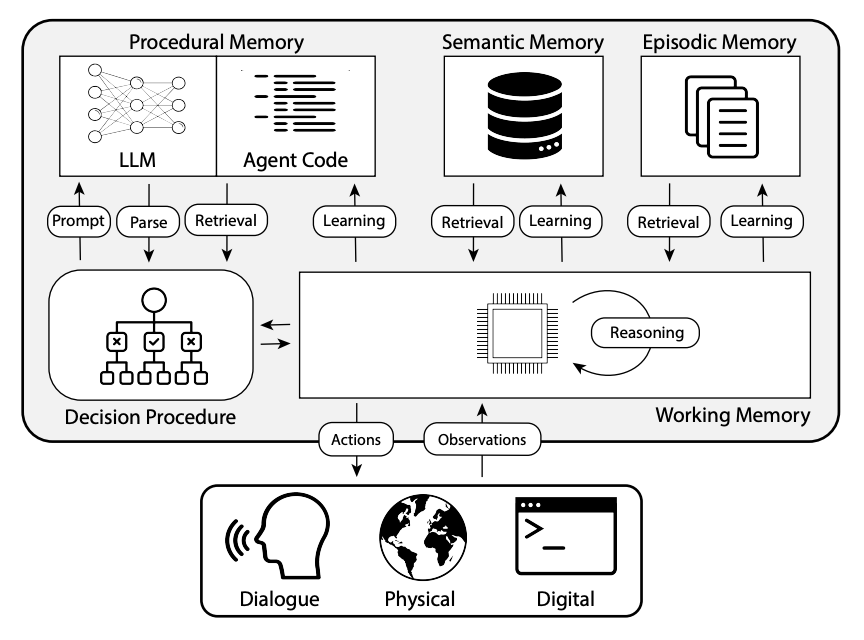
- Memory: Types of memory and how agents use them
- Tools: How agents use external tools to extend their capabilities — including MCP
- Decision Loop: How agents observe, plan, and act in iterative loops
- Agent Patterns: Different agent patterns and production considerations
What is an Agent?
An agent is a system that perceives its environment, reasons about what to do next, and takes actions to achieve a goal. For LLM-powered agents, this translates to:
- Perceives → Text inputs, tool results, API responses, memory retrievals
- Reasons → LLM decides what to do next based on context and goal
- Acts → Tool calls, API requests, generating responses, updating memory
Agency exists on a spectrum — from a simple chatbot that responds to a single message, to a fully autonomous coding agent that opens files, runs tests, debugs errors, and submits a pull request without any human input. Most production agents sit somewhere in the middle, with humans in the loop for key decisions.
From LLMs to Agents: Why Go Further?
While LLMs are incredibly versatile, many real-world applications require more than just language understanding. This is where LLM-powered agents come in.
LLM-powered agents extend base LLMs with three capabilities:
- Tool Use: Agents can interact with the world by calling external tools, APIs, and services — retrieving information or performing actions beyond text generation.
- Persistent Memory: Agents can remember past interactions, user preferences, or facts across sessions — going beyond the context window of a single call.
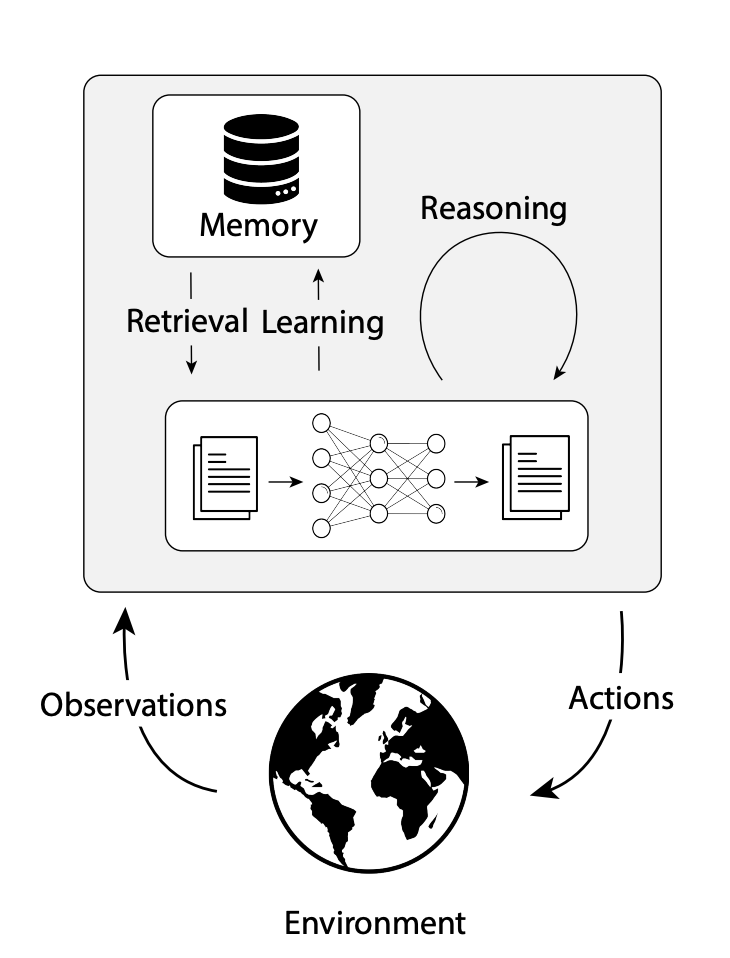
- Decision Loop: The core of every agent — code that runs the LLM in a loop, deciding what to do next at each step, until the goal is reached.

What makes an application agentic is the decision loop — the LLM deciding the control flow, not the developer. Tools and persistent memory add capability based on the complexity and use case. Most production agents combine all three, but understanding what the core is helps you start simple and add complexity only when your use case demands it.
The Engineering Challenge: From Prompts to the Decision Loop
While prompt engineering remains important, building agents means you also need to engineer the decision loop itself:
- Decision Logic: When should the agent call external tools versus respond using the LLM's training knowledge? How does it choose between multiple tools for the same task?
- Error Handling: What happens when a tool call fails or returns unexpected results? How should the agent recover and continue?
- Memory Operations: What information should be stored after each interaction? When should past information be retrieved?
- Loop Termination: How does the agent know when the task is complete? What prevents infinite loops?
The decision loop design varies dramatically by use case — a research agent needs different patterns than a customer service agent or a coding agent. The engineering complexity lies here, not just in crafting prompts.
Agentic LLM Applications: When Are They Needed?
Not every application needs the complexity of an agent. Many tasks that can be completed in a single step or predefined workflows— like summarization, classification, or Q&A—can be solved with just prompt engineering and a workflow-based approach.
However, agents become essential when achieving your goals requires handling multi-step complex tasks and the workflow cannot be fully specified in advance—demanding adaptive, dynamic decision-making.
- Don't Build Agents for Everything: Use agents only for complex, ambiguous, high-value tasks; prefer non-agentic workflows for simple cases.
- Keep It Simple: Start with a minimal architecture (environment, tools, prompt); iterate before adding complexity.
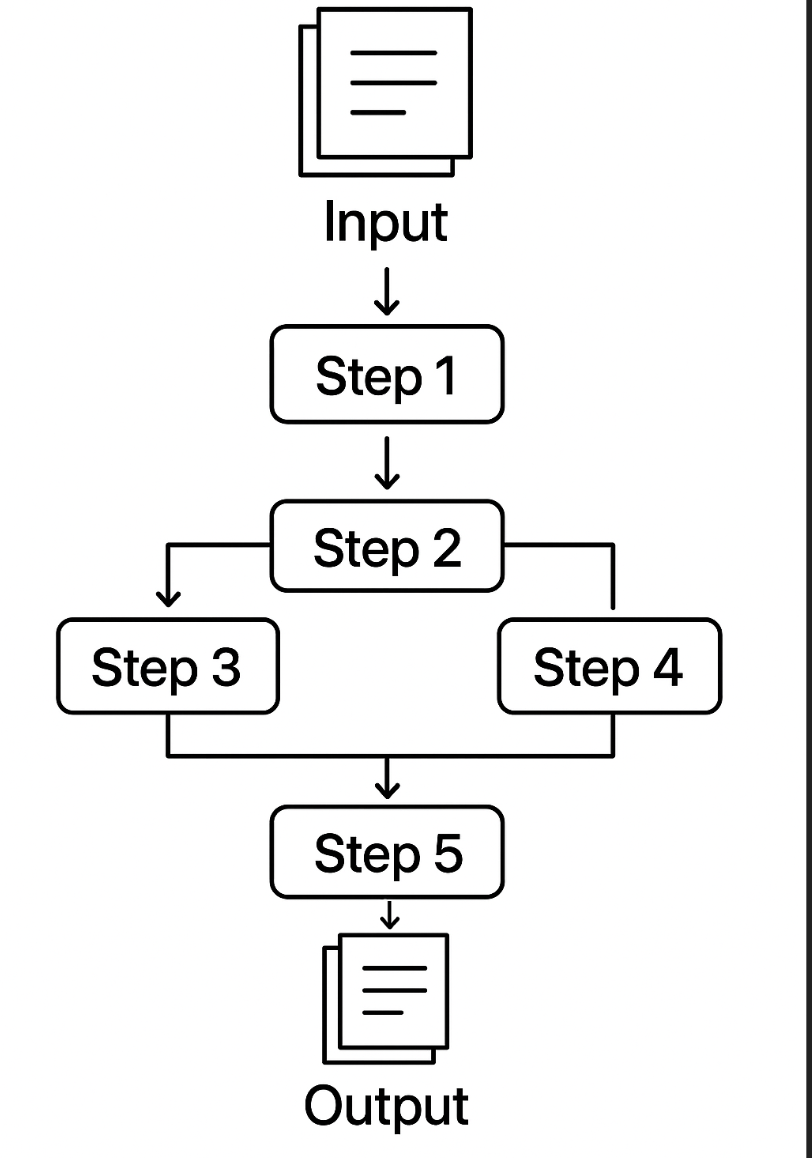
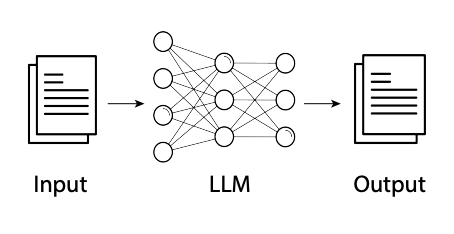
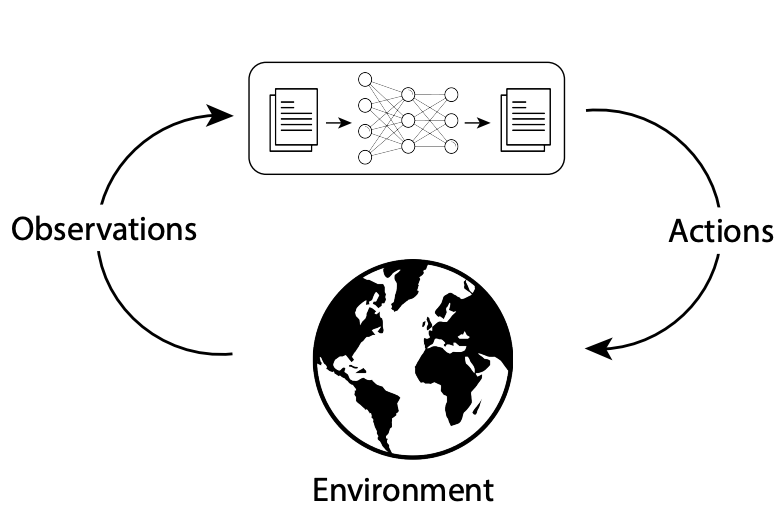
The following table compares traditional workflows, LLM workflows, and agentic LLM Workflow based applications to help clarify when each approach is most appropriate.
| Dimension | Traditional Workflows | LLM Workflow | Agentic LLM App |
|---|---|---|---|
| Visual |
|
|
|
| Description | Software systems with predefined logic and workflows | Applications that use LLMs in one or more fixed, code-defined steps—each step may involve an LLM call or tool, but the workflow is predetermined and not dynamically chosen by the LLM. | Systems operating in a loop—observing its environment, using the LLM's reasoning to decide what to do next, and taking actions to achieve its goals |
| Implementation Complexity | Medium-High (requires specific logic for each task) | Low-Medium (prompt engineering plus predefined integrations) | High (requires orchestration, tool integration, memory systems) |
| Applications & Examples | Well-defined processes: order processing, data validation, reporting | Tasks solved by running the LLM in one or more fixed, code-defined steps—such as content creation, simple chatbots, text-to-SQL, or multi-step data processing—where the workflow and tool use are predetermined and not dynamically chosen by the LLM. | Complex tasks requiring multiple steps reasoning, external data, or persistent context. Customer service agents, research assistants, automated analysts |
| Autonomy: Developer vs LLM | The developer is fully responsible for all logic, control flow, and decision-making. The system follows code paths exactly as written. | The developer still defines the overall workflow and control flow, but the LLM may be used for reasoning or generation within those steps. The LLM does not decide what step comes next. | The LLM (within the agent) participates in or even drives the control flow, making decisions about which tools to use, when to use them, and how to proceed, based on the current context and goal. The developer provides the environment, tools, and guardrails, but the LLM has autonomy within those constraints. |
| Reactivity | Responds to specific triggers and data changes | Responds to user prompts with enhanced context | Responds to environmental changes and adapts strategy accordingly |
| Pro-activeness | Follows predetermined paths without initiative | Reactive within single interactions, no cross-session initiative | Takes initiative to pursue goals across multiple steps and sessions |
| Social Ability | Structured interactions with predefined interfaces | Natural language conversation with enhanced responses | Multi-turn dialogue with context awareness and goal persistence |
| Tool Integration | Pre-programmed connections to specific systems | Predefined tool usage (RAG integrations, LLM output as tool input) | LLM decides which tools to use; orchestrated tool selection with feedback loops |
| Memory Management | Database-driven with explicit schema design | Context window concatenation (limited to context window size) | Persistent across sessions with both short and long-term storage |
| Reasoning Process | Linear, rule-based or algorithmic | Single-step or multi-step reasoning per interaction (may use CoT, ToT, ReAct within prompts) | Multi-step reasoning across interactions with planning and feedback loops |
Example: Document Extraction
- Traditional Workflow: Extracts fixed fields from one type of document that always follows the same structure (e.g., always pulls "Name" and "Date" from a standard lease form).
- LLM Workflow: Can flexibly extract different fields based on the prompt, but still processes one document at a time and does not adapt its process or use external tools.
- Agentic Workflow: Can interact with tools to translate documents, convert between different document types, and extract relevant fields—even adapting its approach based on the document's structure or missing information.
import boto3
import json

# Set up Bedrock client
bedrock = boto3.client("bedrock-runtime", region_name="us-east-1")

def extract_fields(document):
    prompt = (
        "Extract the following fields from this lease document: Tenant Name, Lease Start Date, Rent Amount.\n\n"
        f"Document:\n{document}\n\nFields:"
    )
    body = json.dumps({
        "prompt": prompt,
        "max_tokens_to_sample": 200,
        "temperature": 0
    })
    response = bedrock.invoke_model(
        modelId="us.amazon.nova-pro-v1:0",
        body=body
    )
    result = json.loads(response["body"].read())
    return result["completion"].strip()

# Example document
doc = "This lease is made between John Doe and ACME Corp. Lease starts on 2024-07-01. Monthly rent is $2,500."

# Run the extraction
result = extract_fields(doc)
print(result)
import boto3
import json

# Define your tools
def translate_to_english(text):
# Dummy translation for demo; in real use, call an API or LLM
if "Este contrato" in text:
    return "This lease is made between John Doe and ACME Corp. Lease starts on 2024-07-01. Monthly rent is $2,500."
return text

def extract_fields(text):
# Dummy extraction for demo; in real use, call an LLM
if "John Doe" in text:
    return "Tenant: John Doe, Start Date: 2024-07-01, Rent: $2,500"
return "Fields not found"

# Build prompt for Claude
# Tool registry
TOOLS = {
"translate_to_english": translate_to_english,
"extract_fields": extract_fields,
}

# Bedrock client
bedrock = boto3.client("bedrock-runtime", region_name="us-east-1")

def call_claude(prompt):
body = json.dumps({
    "prompt": prompt,
    "max_tokens_to_sample": 200,
    "temperature": 0
})
response = bedrock.invoke_model(
    modelId="us.amazon.nova-pro-v1:0",
    body=body
)
result = json.loads(response["body"].read())
return result['content'][0]['text'].strip()


def agent_decision_loop(document):
    history = []
    while True:
        #Build prompt for Claude
        prompt = (
            "Your goal: Extract the tenant name, lease start date, and rent amount from the provided lease document. "
            "If the document is not in English, translate it to English first.\n\n"
            "You are an agent that can use the following tools:\n"
            "- translate_to_english(text): Translates text to English if needed.\n"
            "- extract_fields(text): Extracts tenant name, lease start date, and rent amount from an English lease document.\n\n"
            f"Document: {document}\n"
            f"History: {history}\n"
            "What should you do next? Reply with:\n"
            "Action: '<'tool_name'>'\n"
            "Action Input: '<'input'>'\n"
            "or\n"
            "Final Answer: \n"
        )
        output = call_claude(prompt)
        print("Claude Output:", output)
        if output.startswith("Final Answer:"):
            return output[len("Final Answer:"):].strip()
        elif output.startswith("Action:"):
            lines = output.splitlines()
            action = lines[0].split(":", 1)[1].strip()
            action_input = lines[1].split(":", 1)[1].strip()
            result = TOOLS[action](action_input)
            history.append({"action": action, "input": action_input, "result": result})
            document = result  # For this simple example, update document for next step
        else:
            return "Agent did not understand what to do."


# Example usage
spanish_doc = "Este contrato de arrendamiento es entre John Doe y ACME Corp. Comienza el 1 de julio de 2024. La renta mensual es de $2,500."
print(agent_decision_loop(spanish_doc))
Agent Patterns
Agentic LLM applications can be implemented in various ways depending on the application needs. Here are some of the patterns you'll encounter:
| Pattern | Description | Best For | Example |
|---|---|---|---|
| Conversational Agents | One agent handles multi-turn conversations with users | Customer service, personal assistants, Q&A systems | ChatGPT-style interfaces, support chatbots, coding assistants etc. |
| Task-Oriented Agents | Designed to complete specific workflows or objectives, including those requiring interaction with browsers, desktop applications, or system interfaces. Computer use agents can control a browser or desktop UI directly — no API required. | Automated analysis, report generation, document handling, web automation, coding tasks | Coding agents (Claude Code, Cursor, GitHub Copilot Agent Mode), market research agent, web scraping agent |
| Multi-Agent Systems | Multiple specialized agents collaborate on complex tasks | Complex workflows requiring different expertise areas | Research team (data gathering, analysis, reporting) |
| Human-in-the-Loop Systems | Require human approval for key decisions or actions | High-stakes decisions, regulated environments, building trust | Investment recommendations needing manager approval |
Production Considerations
Building agents for production environments requires careful attention to several critical areas:
| Area | Key Practices/Considerations |
|---|---|
| Reliability & Error Handling | Retry logic, graceful degradation, clear error messaging, fallback mechanisms |
| Output Consistency | Structured output (JSON/templates), temperature=0, human review, pin model versions, comprehensive testing |
| Cost & Performance | Monitor token usage, cost guardrails, optimize loops, caching, balance thoroughness and latency |
| Security & Access Control | Access controls, authentication, audit logging, guardrails, input validation/sanitization |
| Monitoring & Observability | Track decision paths, tool usage, failure rates, monitor for anomalies, maintain logs, collect metrics, alerts |
Module 3 Summary
In this module, you learned how modern AI agents are designed to go beyond simple text generation. You explored:
- The fundamentals of what makes an AI agent, including the importance of memory, tools, and the decision loop
- How agents use different types of memory (working, episodic, semantic, procedural) to remember, reason, and act
- The various ways agents interact with external environments using tools and integration patterns
- The decision loop that enables agents to observe, plan, act, and learn—mirroring the way human knowledge workers handle tasks
- The importance of separating the agent's decision loop logic from the LLM's language and reasoning capabilities, and how frameworks like LangChain, CrewAI, and others can help you build robust, production-ready agents
By understanding these concepts, you're now equipped to design and build AI agents that can autonomously assist, augment, or automate knowledge work in digital applications.
Resources
Core Reading
- Building Effective Agents — Anthropic Engineering Blog
anthropic.com — Practical advice, best practices, and design patterns including when to use workflows vs. agents. Start here. - How We Build Effective Agents — Barry Zhang, Anthropic
YouTube — Companion talk with practical implementation insights from an Anthropic engineer. - CoALA: Cognitive Architectures for Language Agents
arXiv — Academic framework for memory types (working/episodic/semantic/procedural) in language agents.
AWS / Bedrock
- Amazon Bedrock AgentCore
aws.amazon.com — Managed runtime for production agents on AWS: memory, MCP gateway, tool registry, guardrails, observability. - Amazon Bedrock Agents
aws.amazon.com — Fully managed agent builder with multi-agent collaboration, knowledge bases, and guardrails. - AWS Strands Agents SDK
GitHub — Open-source Python SDK from AWS for building agents with native Bedrock and MCP integration.
Frameworks
- LangGraph
langgraph docs — Graph-based framework for stateful, multi-step agentic workflows. Recommended for production agents over basic LangChain. - CrewAI
GitHub — Multi-agent collaboration and role-based workflow orchestration. - Microsoft AutoGen
GitHub — Framework for multi-agent and tool-using systems with human-in-the-loop support.