Module 4: Embeddings & Retrieval-Augmented Generation (RAG)
In Module 1 we saw that LLMs have real limitations: a knowledge cutoff date, no access to your private data, and a tendency to hallucinate when asked about facts they don't know. Retrieval-Augmented Generation (RAG) is the most widely used technique to address all three — and embeddings are what make it work.
This module builds on the embeddings introduction in Module 1 and delivers on the pointer in Module 2 where we removed the RAG section and said it would live here.
What You'll Learn
- Embeddings (deep dive): How semantic similarity works, why it beats keyword search, and what dimensions actually mean
- Embedding Models: Amazon Titan, Cohere — how to choose the right one
- Vector Stores: Where embeddings live — OpenSearch, Aurora pgvector, FAISS, Pinecone, and when to use each
- RAG Pipeline: The full architecture — chunking, retrieval, reranking, and prompt augmentation
- AWS Bedrock Knowledge Bases: Fully managed RAG that collapses most of the above into configuration
Embeddings: Meaning as Mathematics
In Module 1 we introduced embeddings as "words represented as points in space where similar words are closer together." Here we go deeper — because understanding how similarity search works is what makes RAG intuitive.
From Words to Vectors
An embedding model takes text (a word, sentence, or entire document) and outputs a fixed-length list of numbers — a vector. These numbers aren't random; they encode semantic meaning. Words or passages with similar meaning end up with similar vectors.
Cosine Similarity
To find how similar two pieces of text are, you compare their vectors using cosine similarity — the cosine of the angle between them. A score of 1.0 means identical meaning; 0.0 means unrelated; -1.0 means opposite meaning. This is how a search system finds the most relevant documents for a query — it embeds the query, then finds the stored documents with the highest cosine similarity.
Why Embeddings Beat Keyword Search
Keyword search requires the exact same words to appear. A query for "how do I reset my password" won't find a document titled "account recovery instructions" — different words, same meaning. Embeddings search by meaning, not by word match. This is the core superpower that makes RAG possible.
Not Just Text
Embedding models can encode more than text:
- Text embeddings: Sentences, paragraphs, documents — most common for RAG
- Image embeddings: Visual content encoded as vectors, enabling image similarity search
- Multimodal embeddings: A single embedding space for both text and images — so a text query like "red sports car" can retrieve visually matching images. Amazon Titan Multimodal Embeddings is an example.
What Do Dimensions Mean?
An embedding vector might have 256, 512, 1024, or 3072 dimensions. More dimensions = more capacity to capture nuance, but also higher storage and compute cost. For most RAG use cases, 1024 dimensions is the sweet spot. The actual values of each dimension aren't interpretable — what matters is the relative distance between vectors.
Embedding Models: Which One to Use?
Choosing the right embedding model matters — the same text will produce different vectors depending on which model you use, and you must use the same model consistently for both indexing and querying.
Key Options
| Model | Provider | Dimensions | Best For | Notes |
|---|---|---|---|---|
| Titan Text Embeddings V2 | Amazon (via Bedrock) | 256 / 512 / 1024 | General RAG, AWS-native workloads | Adjustable dimensions — lower = cheaper storage; supports 8K token input |
| Titan Multimodal Embeddings | Amazon (via Bedrock) | 384 / 1024 | Image + text search in one index | Single embedding space for both modalities |
| Cohere Embed v3 | Cohere (via Bedrock) | 1024 | High-quality retrieval, multilingual | English and multilingual variants; strong benchmark performance |
How to Choose
- AWS workloads: Start with Titan Text Embeddings V2 — native Bedrock pricing, no egress, Bedrock Knowledge Bases uses it by default
- Multilingual content: Cohere Embed v3 multilingual outperforms Titan for non-English
- Image + text search: Titan Multimodal Embeddings is the only AWS-native option
- Retrieval quality matters most: Cohere Embed v3 — strong benchmark performance, benchmark on your own data
- Cost-sensitive at scale: Use lower dimensions (256/512) — Titan V2 lets you choose without changing the model
Vector Stores: Where Embeddings Live
Once you've embedded your documents, you need somewhere to store the vectors and — critically — query them efficiently. Finding the top-K nearest vectors in a 1024-dimensional space across millions of documents isn't something a traditional SQL database does well. Vector stores are built (or extended) for this.
AWS Options
| Store | What it is | When to use it |
|---|---|---|
| Amazon OpenSearch (k-NN) | OpenSearch was built for full-text search (like Elasticsearch). The k-NN plugin adds approximate nearest-neighbor vector search. You supply your own vectors — embed documents first, then store them. You manage the index, shards, and cluster. | Most flexible AWS option. Good if you need both text search and vector search on the same data, or need fine-grained control over indexing and retrieval. |
| Aurora pgvector | A PostgreSQL extension that adds a vector column type and similarity search operators. Runs on Amazon Aurora (PostgreSQL-compatible). | Good if your application already uses Aurora and you want to avoid another service. Simpler operationally, but slower than purpose-built vector DBs at large scale. |
Third-Party Options
| Store | What it is | When to use it |
|---|---|---|
| FAISS | Facebook AI Similarity Search — a library (not a server) that runs in-process. You load vectors into RAM and query them locally. | Local development, prototyping, offline use cases. No server to manage, but no persistence across restarts and doesn't scale beyond one machine. |
| Pinecone | Fully managed, purpose-built vector database. Simple API, serverless option available. | Quickest path to production if you don't want to manage infrastructure. Supported as a Bedrock Knowledge Bases backend. |
| Chroma | Open-source vector DB (Apache 2.0) with a developer-friendly API. Runs embedded in-process or as a standalone server. Persists to disk by default. | Best starting point for RAG prototyping — clean API, works well with LangChain/LlamaIndex, handles persistence without extra setup. |
Quick Decision Guide
- Prototyping / local dev — start here: Chroma (friendlier API, built-in persistence) or FAISS (raw speed, fully in-memory)
- Production on AWS, need control: OpenSearch k-NN
- Already on Aurora PostgreSQL: pgvector
- Fully managed end-to-end: Use Bedrock Knowledge Bases (see next section) — it handles the vector store for you
The RAG Pipeline: Architecture & Key Decisions
RAG works by retrieving relevant context from your knowledge base and injecting it into the LLM's prompt before generating a response. The LLM never "learns" your data — it reads it at inference time. This means the retrieval quality directly determines the answer quality.
The Full Architecture
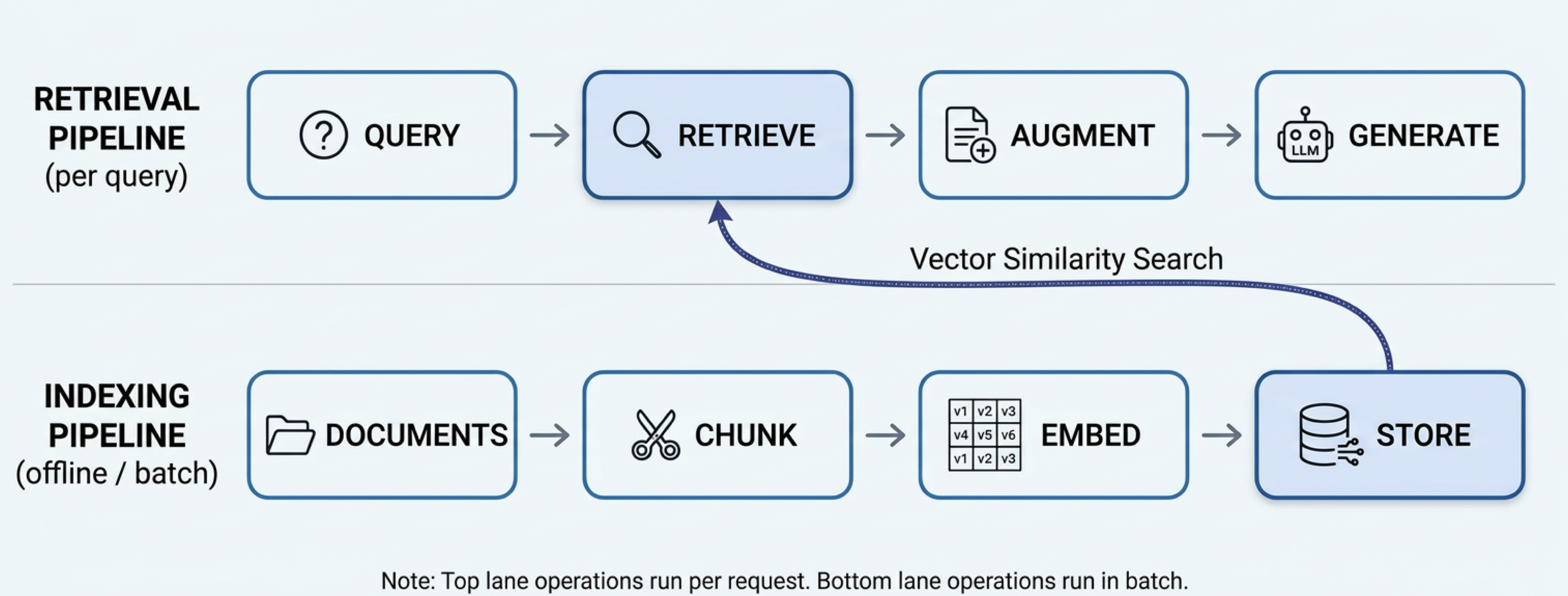
The indexing pipeline (bottom lane) runs offline in batch — you chunk documents, attach metadata, embed the chunks, and store them in the vector store. The retrieval pipeline (top lane) runs on every user request — the query is embedded, metadata filters narrow the search space, vector similarity search finds the most relevant chunks, those chunks augment the prompt, and the LLM generates the answer.
1. Chunking — Why It Matters
You can't embed an entire 50-page document as a single vector — you'd lose the ability to pinpoint which part of the document is relevant. Chunking splits documents into retrievable units. The strategy affects retrieval quality significantly:
| Strategy | How it works | Best for |
|---|---|---|
| Fixed-size | Split every N tokens (e.g. 512), with optional overlap between chunks | Simple starting point; works reasonably for most content |
| Sentence-boundary | Split at sentence ends to avoid cutting mid-thought | Prose documents, articles, documentation |
| Semantic | Group sentences with similar meaning into chunks; split when topic changes | Long documents with distinct sections |
| Hierarchical | Index at multiple granularities (e.g. paragraph + document summary) | When you need both precise retrieval and broader context in the response |
Chunk size involves a tradeoff: smaller chunks → more precise retrieval; larger chunks → more context per retrieved piece. A common starting point is 512 tokens with 50-token overlap. Test on your actual queries.
2. Retrieval — Finding What's Relevant
Three retrieval approaches:
- Dense (vector) retrieval: Embed the query, find chunks with highest cosine similarity. Understands meaning but can miss exact keyword matches.
- Sparse (BM25/keyword) retrieval: Classic term-frequency search. Misses semantic relationships but great at exact matches (product codes, names, IDs).
- Hybrid retrieval: Runs both and merges results (typically with Reciprocal Rank Fusion). Best of both worlds — recommended for production. Bedrock Knowledge Bases supports hybrid search natively.
3. Metadata Filtering — Narrowing the Search Space
Without metadata filtering, a query for "what is our vacation policy?" searches every chunk in your index — and vector similarity might surface chunks from the engineering wiki or sales playbook that are topically close but completely wrong for the user asking. Metadata filtering constrains retrieval to the relevant slice of your knowledge base before (or alongside) the similarity search.
Two Levels of Metadata
Metadata can live at two granularities, and both get attached to each chunk at index time:
- Document-level metadata — properties of the source document that all its chunks inherit:
department,doc_type,author,created_at,status,access_role. If a document belongs to HR, every chunk from that document getsdepartment: "hr". - Chunk-level metadata — properties specific to that chunk:
page_number,section_title,chapter. Useful for long PDFs or hierarchical documents where you want to retrieve a specific section, not just the right document.
How It Works
At index time, attach metadata when you store each chunk. At retrieval time, pass a filter alongside the query — the vector store applies it before computing similarities:
# Index time: attach metadata to each chunk
collection.add(
    ids=["chunk-001", "chunk-002"],
    embeddings=[embed("...vacation policy text..."), embed("...sales playbook text...")],
    documents=["...vacation policy text...", "...sales playbook text..."],
    metadatas=[
        {"department": "hr", "doc_type": "policy", "status": "published"},
        {"department": "sales", "doc_type": "playbook", "status": "published"}
    ]
)

# Retrieval time: filter to HR docs only before similarity search
results = collection.query(
    query_embeddings=[embed(user_query)],
    n_results=5,
    where={"department": "hr"}   # only search HR chunks
)
OpenSearch, pgvector, and Bedrock Knowledge Bases all support similar pre-filtering. In Bedrock Knowledge Bases, you pass a filter object in the retrieval configuration alongside your query.
4. Reranking — Refining the Top-K
Vector search retrieves the top-K approximately most relevant chunks (e.g. top 20). A reranker takes those 20 and re-scores them using a more expensive but accurate cross-encoder model, returning the top 3-5 for the prompt. Cohere Rerank is the most commonly used option and is available via Bedrock.
Reranking adds latency and cost, but significantly improves precision — worth it when your answer quality is sensitive to context relevance.
4. Prompt Augmentation
The final step: inject the retrieved chunks into the prompt before sending to the LLM. A typical pattern:
You are a helpful assistant. Answer the user's question using ONLY the provided context.
If the context doesn't contain enough information to answer, say so.

<context>
{retrieved_chunk_1}

{retrieved_chunk_2}

{retrieved_chunk_3}
</context>

Question: {user_query}
Answer:
Key practices: use delimiters to clearly separate context from the question, instruct the model to stay within the provided context, and include a fallback for when the context is insufficient. This ties back to the prompt engineering techniques in Module 2.
AWS Bedrock Knowledge Bases: Managed RAG
Bedrock Knowledge Bases is AWS's fully managed RAG service. Rather than building the indexing and retrieval pipeline yourself (chunks → embed → store → retrieve), you configure it and AWS runs it. For most production use cases on AWS, this should be your starting point.
What It Handles For You
- Data connectors: Ingest from S3, web crawlers, SharePoint, Confluence, Salesforce — no custom ingestion code
- Chunking: Fixed, semantic, hierarchical, or custom strategies — configurable without code
- Embedding: Choose your model (Titan V2, Cohere Embed) — KB handles embedding and re-embedding on updates
- Vector store: Managed OpenSearch Serverless by default; can also use Aurora pgvector, Pinecone, Redis Enterprise, MongoDB Atlas
- Hybrid search: Dense + sparse retrieval combined — enabled with one config flag
- Sync: Detects document changes and incrementally re-indexes
Querying a Knowledge Base
import boto3

bedrock_agent_runtime = boto3.client("bedrock-agent-runtime", region_name="us-east-1")

response = bedrock_agent_runtime.retrieve_and_generate(
    input={"text": "What is our refund policy for digital products?"},
    retrieveAndGenerateConfiguration={
        "type": "KNOWLEDGE_BASE",
        "knowledgeBaseConfiguration": {
            "knowledgeBaseId": "YOUR_KB_ID",
            "modelArn": "arn:aws:bedrock:us-east-1::foundation-model/us.amazon.nova-pro-v1:0",
            "retrievalConfiguration": {
                "vectorSearchConfiguration": {
                    "numberOfResults": 5,
                    "overrideSearchType": "HYBRID"   # dense + sparse combined
                }
            }
        }
    }
)

print(response["output"]["text"])

# Citations are returned alongside the answer
for citation in response.get("citations", []):
    for ref in citation.get("retrievedReferences", []):
        print(f"  Source: {ref['location']['s3Location']['uri']}")
When to Use Bedrock KB vs. Build Your Own
| Bedrock Knowledge Bases | Custom RAG Pipeline | |
|---|---|---|
| Setup time | Minutes (console or CDK) | Days to weeks |
| Chunking control | Good (4 built-in strategies) | Full control |
| Custom retrieval logic | Limited | Full control (reranking, filtering, multi-hop) |
| Data sources | Connectors for major sources | Any source you can code against |
| AWS integration | Native (IAM, CloudTrail, VPC) | Must wire up yourself |
| Cost model | Per query + per token | Vector store + embedding costs |
| Best for | Most production use cases; internal knowledge bases; prototyping | Complex retrieval requirements; non-standard data; full control needed |
Rule of thumb: start with Bedrock Knowledge Bases. Build a custom pipeline only if KB's retrieval quality or configuration options aren't sufficient for your use case after testing.
Resources
Core Reading
- RAG Paper (Original)
Lewis et al., 2020 — arXiv — The original Retrieval-Augmented Generation paper from Meta AI. Foundational reading. - Chunking Strategies for LLM Applications
Pinecone Learn — Practical guide to chunking methods with tradeoffs. - Advanced RAG Techniques
Gao et al., 2023 — arXiv — Survey of RAG improvements (hybrid search, reranking, query rewriting, and more).
AWS / Bedrock
- Amazon Bedrock Knowledge Bases
aws.amazon.com — Official docs for managed RAG on AWS. - Amazon Titan Embeddings
aws.amazon.com — Titan V2 and Multimodal Embeddings documentation. - OpenSearch k-NN Guide
opensearch.org — k-NN vector search in OpenSearch, including HNSW and IVF index types. - pgvector on Aurora
aws.amazon.com — pgvector support in Amazon Aurora PostgreSQL.
Tools & Libraries
- FAISS — github.com/facebookresearch/faiss — In-process vector search library, ideal for local development
- Cohere Rerank — docs.cohere.com — Cross-encoder reranking model, available via Bedrock
- LangChain RAG How-To — python.langchain.com — Practical RAG patterns with code examples