Module 5: Developer's Guide to Model Context Protocol (MCP)
As LLMs became more powerful, developers wanted to connect them to external tools and data. Early attempts relied on custom, one-off solutions, which were difficult to maintain, inconsistent, and often insecure.
This module introduces developers to the Model Context Protocol (MCP), a standardized protocol developed by Anthropic that enables Large Language Models (LLMs) to interact with external tools, APIs, and data sources in a structured and secure way.
Launch the companion lab notebook to practice building and testing MCP client-server integrations. In the lab, you'll transform direct tool calls into protocol-based interactions, experience the three-layer MCP architecture, and see how modular, secure AI integrations work in practice.
What You'll Learn
- Architecture: The roles and responsibilities of the host, client, and server in an MCP system, ensuring modularity, security, and clear separation of concerns.
- Core Message Types: Standardized JSON-RPC message types—requests, responses, notifications, and errors—that enable structured, reliable, and extensible communication between MCP components.
- Features: Outlines the core capabilities MCP enables—such as resources, tools, prompts, and sampling—allowing clients and servers to declare, negotiate, and use powerful, composable functions.
- Connection Lifecycle: How MCP sessions are initialized, maintained, and terminated, including capability negotiation and supported transport protocols for robust, stateful connections.
- Transport Protocols: Supported communication protocols (stdio, HTTP), session management, and authorization.
- Security Principles: Best practices and requirements for user consent, access control, and safe tool use, ensuring secure and trustworthy MCP integrations.
You will learn how these elements together make MCP a robust, extensible, and secure foundation for advanced AI integrations.
Architecture
MCP System Overview
High-Level Architecture: Host, Client, and Server
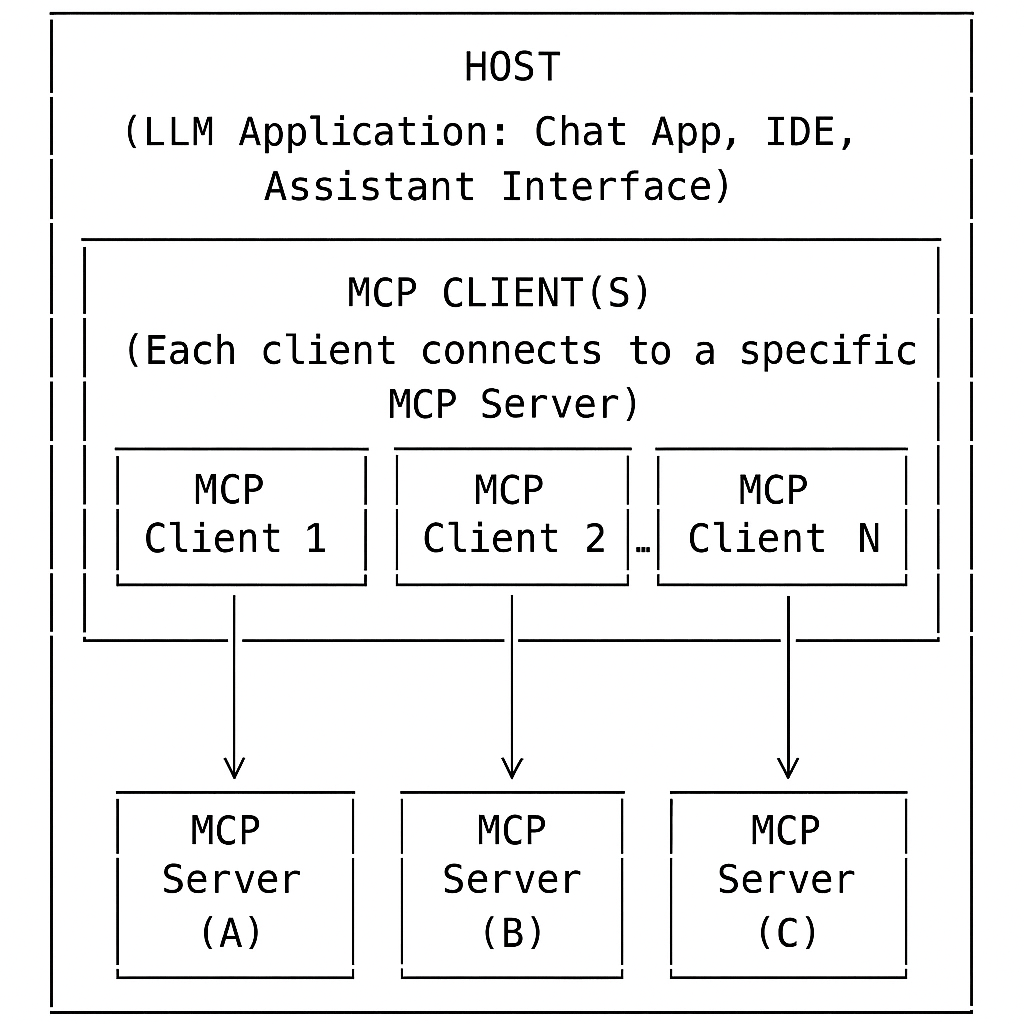
| Role | Main Responsibility | Example |
|---|---|---|
| Host |
Manages user input, LLM interactions, security, user consent, and connections |
IDE Application: Receives a user's code question, uses the LLM to interpret it, decides to call the code search tool, and displays the answer in the UI. |
| Client | Protocol handler, connects to one server, enforces boundaries | Code Search Connector: Receives a search request from the host, sends it to the code search server, and returns the results. |
| Server | Operates independently—cannot access the full conversation or other servers. Processes requests only from its assigned client and provides access to resources, tools and prompts. | Code Search Server: Indexes project files and responds to search queries from the client. |
MCP Design Principles
How It Works (At a Glance): Practical Example
Scenario: A user interacts with an AI-powered productivity assistant (the host) that integrates both a calendar tool and a weather tool.
- User: Asks, "Do I have any meetings this afternoon, and what's the weather forecast for that time?"
- Host: Uses the LLM to interpret the request and determines it needs to:
- Check the user's calendar for meetings this afternoon (calendar tool)
- Get the weather forecast for the meeting time (weather tool)
- Host: Uses Client 1 to connect to Server 1 (Calendar Tool), which returns: "You have a meeting at 3:00 PM."
- Host: Uses Client 2 to connect to Server 2 (Weather Tool), which returns: "The forecast at 3:00 PM is sunny, 75°F."
- Security Boundary: Each client only communicates with its assigned server. The calendar server never sees weather data, and vice versa.
- Host: Aggregates the results and presents: "You have a meeting at 3:00 PM. The weather at that time is expected to be sunny, 75°F."
Key Point: This example shows how MCP enables secure, modular, and orchestrated multi-tool workflows.
Core Message Types
MCP uses JSON-RPC 2.0 as its wire format — an industry-standard protocol for structured remote procedure calls. You don't need to memorize the spec, but understanding the four message types tells you how any MCP interaction is structured under the hood.
| Type | Direction | Has ID? | What it does | Example |
|---|---|---|---|---|
| Request | Client → Server or Server → Client | Yes | Ask another component to do something; expects a Response or Error back | Call a tool, read a resource, request a completion |
| Response | Opposite of Request | Yes (matches Request) | Return the result of a Request. Contains either result or error — never both |
Tool result, resource content |
| Error | Opposite of Request | Yes (matches Request) | Return a failure for a Request. Includes an error code and human-readable message | Method not found, invalid params, internal server error |
| Notification | Either direction | No (intentionally omitted) | One-way event — fire and forget, no response expected | Resource updated, request cancelled, progress update |
What a Request/Response Looks Like
// Request: client asks server to read a resource
{
  "jsonrpc": "2.0",
  "id": 1,
  "method": "resources/read",
  "params": { "id": "abc123" }
}

// Response: server returns the result
{
  "jsonrpc": "2.0",
  "id": 1,                          // matches the request id
  "result": { "name": "policy.pdf", "data": "..." }
}

// Notification: server tells client a resource changed (no id, no response expected)
{
  "jsonrpc": "2.0",
  "method": "notifications/resources/updated",
  "params": { "resourceId": "abc123" }
}Features
MCP defines a set of features—such as resources, tools, prompts, sampling, and roots—that enable applications to interact with external data, perform actions, and extend AI capabilities in a standardized, secure manner.
Server Features
📦 Resources: Structured data or context a server provides.
How it works: Exposes data (files, DB tables, API results) as resources for the client/LLM.
Example: List of files in a project; customer records from a database.
🛠️ Tools: Functions or actions the AI assistant can invoke.
How it works: Client/LLM calls tools via MCP to perform operations.
Example: Search database, format code.
📝 Prompts: Templated messages or workflows to guide LLM/user.
How it works: Standardizes tasks and interactions.
Example: Summarize a document; onboarding workflow.
Tip: Use a resource for static or subscribable data; use a tool for dynamic, parameterized queries or actions.
Client Features
🎲 Sampling: Lets the server request the client to generate a completion or response from the LLM.
How it works: Server asks the client to use its LLM for tasks like summarization or drafting.
Example: Server requests a summary of a document.
📁 Roots: Defines boundaries of accessible directories/files for the server.
How it works: Client exposes only specific directories to the server.
Example: Only the "/projects/my-app" folder is accessible to a code analysis server.
MCP Connection Lifecycle
The connection lifecycle in the Model Context Protocol (MCP) defines how a session is established, maintained, and terminated between a client and a server, with the host orchestrating the process. This lifecycle ensures robust, secure, and feature-negotiated communication for all MCP-compliant integrations.
Lifecycle Phases
1. Initialization 🤝
- Host: Starts the session and initializes the client.
- Client: Sends initialization request to the server, declaring supported features.
- Server: Responds with its own capabilities.
- Negotiation: Only mutually supported features are enabled. 🔄
2. Active Session 🔄
Once initialized, the session enters an active state where both sides know which features are available.- Client Requests:
- User/LLM: Initiates actions (e.g., tool calls, resource queries).
- Host: Orchestrates the process, routes requests to the correct client/server.
- Client: Sends structured requests to the assigned server.
- Server: Processes requests and returns responses.
- Host: May aggregate, filter, or post-process responses before updating the UI or LLM.
- Server Requests:
- Server: Can request the client/LLM to perform a task (e.g., generate a completion).
- Client: Forwards the request to the LLM, under host supervision.
- Host: May enforce security, consent, or policy checks.
- Client: Returns the LLM's response to the server.
- Notifications:
- Client/Server: Can one-way send notifications for events (e.g., resource updates, status changes).
- Host: Routes/handles notifications, updates UI or triggers further actions.
3. Termination ⏹️
- Who: Server, client, or host can initiate termination (e.g., on completion, user request, or error).
- How: Termination is communicated explicitly via protocol messages or notifications.
- Host: Mediates/coordinates termination, notifies all parties, and updates the UI or application state.
- Cleanup: All resources (connections, memory, temp files) are released.
- Result: Session ends cleanly, and the system is ready for new sessions or safe shutdown.
Lifecycle Diagram
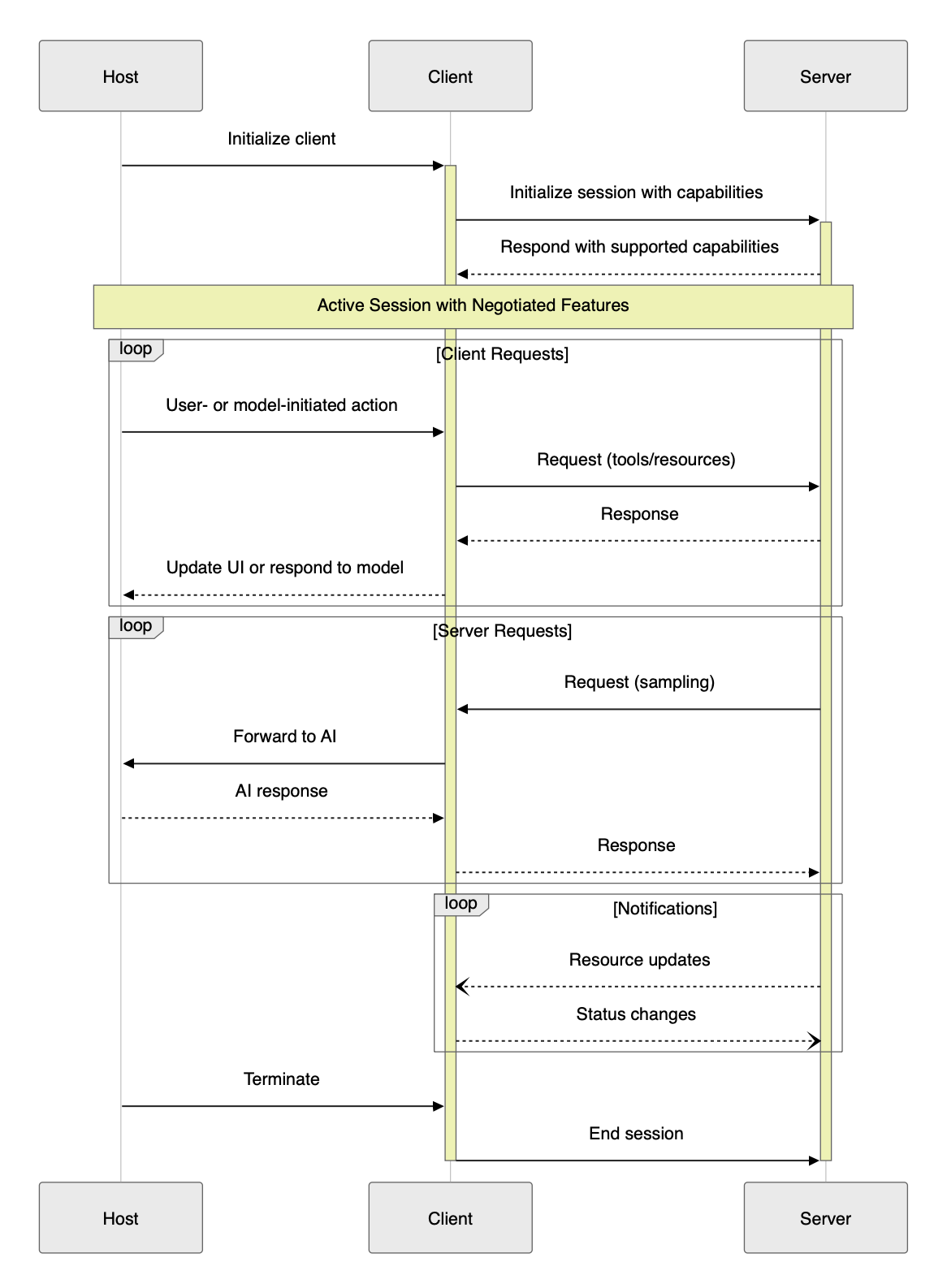
The diagram above illustrates the key phases and message flows in a typical MCP session, including initialization, active session management, requests, notifications, and termination.
Key Points
- Capability negotiation during initialization ensures only mutually supported features are active.
- Requests and notifications flow in both directions, enabling rich, interactive workflows.
- Termination is explicit, ensuring clean shutdown and resource management.
Transport Protocols
Transport Protocols in MCP
- 🖥️ stdio: Client launches the MCP server as a subprocess and exchanges messages via standard input/output.
Fast and ideal for local tools. - 🌐 Streamable HTTP: Client and server communicate over HTTP using POST and GET requests. Supports both single-response and real-time streaming.
| Header | Used In | Purpose |
|---|---|---|
| Content-Type | POST | Specifies message format (JSON) |
| Accept | POST/GET | Indicates accepted response types (JSON, streaming) |
| Mcp-Session-Id | Both | Identifies the session |
- POST: Client sends JSON-RPC messages in a POST request (
Content-Type: application/json). Accept header signals support forapplication/jsonandtext/event-stream. Server responds with single or streaming response. Mcp-Session-Id header is used if a session is active. - GET: Client can open a persistent connection with
Accept: text/event-stream. Server responds withContent-Type: text/event-stream. Mcp-Session-Id is included if a session is active.
This approach enables both single-response and real-time, streaming communication, making MCP suitable for a wide range of use cases.
See the MCP Transports documentation for more details.
Authorization in MCP (2025-03-26 Spec)
- Authorization is optional in MCP, but for HTTP-based transports, it is strongly recommended for security.
- 🌐 OAuth 2.1 is the recommended method for secure authorization and access control.
- 🖥️ For stdio, credentials are typically managed via the environment.
- See the MCP Authorization documentation for full details and best practices.
Session Management in MCP
- MCP supports session management for stateful interactions between clients and servers.
- With Streamable HTTP, the server may assign a unique session ID during initialization (
Mcp-Session-Idheader). - Client must include this session ID in all subsequent requests for the session's duration.
- Sessions can be explicitly terminated by the client or server, ensuring clean resource management and robust error handling.
For more, see Session Management in the MCP spec.
Security and Trust & Safety
This section is a direct, word-for-word reference from the official MCP specification for accuracy and authority.
The Model Context Protocol (MCP) enables powerful integrations between LLMs and external tools or data sources. With this power comes significant responsibility: implementers must ensure robust security, user trust, and safety at every stage of development and deployment.
Key Principles
- User Consent and Control
Users must explicitly consent to all data access and operations. Users should always understand and control what data is shared and what actions are taken on their behalf. Applications should provide clear UIs for reviewing and authorizing activities. - Data Privacy
Hosts must obtain explicit user consent before exposing user data to servers. Resource data must not be transmitted elsewhere without user consent, and all user data should be protected with appropriate access controls. - Tool Safety
Tools represent arbitrary code execution and must be treated with caution. Descriptions of tool behavior should be considered untrusted unless obtained from a trusted server. Hosts must obtain explicit user consent before invoking any tool, and users should understand what each tool does before authorizing its use. - LLM Sampling Controls
Users must explicitly approve any LLM sampling requests. Users should control whether sampling occurs, the actual prompt sent, and what results the server can see. The protocol intentionally limits server visibility into prompts.
Implementation Guidelines
- Build robust consent and authorization flows into your applications.
- Provide clear documentation of security implications for users and developers.
- Implement appropriate access controls and data protections.
- Follow security best practices in all integrations.
- Consider privacy implications in all feature designs.
While MCP itself cannot enforce these principles at the protocol level, it is the responsibility of every implementer to uphold them in practice.
The MCP Ecosystem
MCP's value multiplies with the ecosystem around it. Rather than building every integration from scratch, you can pick from a growing library of pre-built servers, connect through managed gateways, or discover community tools via registries.
Pre-Built MCP Servers
Anthropic and the community maintain official reference servers for the most common integration targets. Drop one of these in and your agent immediately gains access to that capability:
| Server | What it gives your agent |
|---|---|
| Filesystem | Read, write, and search files on the local file system — with configurable directory boundaries |
| GitHub | Search repos, read files, create/update issues and PRs, manage branches |
| PostgreSQL | Run read-only SQL queries against a Postgres database; schema inspection |
| Slack | Read channel history, post messages, look up users |
| Brave Search | Web search and local search via the Brave Search API |
| Google Maps | Geocoding, place search, directions |
| AWS Knowledge Base | Query Amazon Bedrock Knowledge Bases (RAG) directly via MCP |
Full list and source code: github.com/modelcontextprotocol/servers
Registries — Discovering Community Servers
The community has built hundreds of additional MCP servers. Two registries to know:
- mcp.so — curated directory of MCP servers with search, categories, and install instructions
- Smithery.ai — registry focused on discoverability and one-click deployment; includes usage stats and reviews
Building MCP Servers with FastMCP
When you need a custom MCP server, FastMCP is the fastest way to build one. It's now part of the official MCP Python SDK (from mcp.server.fastmcp import FastMCP) and turns a full server into a handful of decorated functions — no manual JSON schema, no boilerplate lifecycle code.
| Approach | Code required | Best for |
|---|---|---|
| Raw MCP SDK | ~40 lines for a single tool | Full protocol control, non-Python environments |
| FastMCP | ~5 lines for a single tool | Most custom servers — Python, fast iteration |
from mcp.server.fastmcp import FastMCP

mcp = FastMCP("weather-server")

@mcp.tool()
def get_weather(city: str) -> str:
    """Get current weather for a city."""
    return f"72°F, sunny in {city}"   # replace with real API call

if __name__ == "__main__":
    mcp.run()   # stdio by default; mcp.run(transport="sse") for HTTP
FastMCP infers tool schemas from Python type hints and docstrings. It supports tools, resources, and prompts, and runs over stdio (local) or HTTP (remote/cloud).
Amazon Bedrock AgentCore Gateway
For enterprise deployments on AWS, Bedrock AgentCore Gateway is a managed MCP gateway that sits between your agent (the MCP client/host) and your MCP servers. Instead of each agent directly managing connections to every server, the gateway handles routing, authentication, and access control centrally.
- Single endpoint — agents connect to one gateway URL instead of managing per-server connections
- IAM-based auth — access to MCP servers controlled via AWS IAM roles and policies
- Audit logging — all tool calls logged to CloudTrail for compliance
- Works with Bedrock Agents — native integration with Amazon Bedrock Agents as the host
For Amazon SDEs building agents that need to call internal tools or APIs, AgentCore Gateway is the AWS-native path to doing this securely at scale.
Standards & Governance
MCP started as an Anthropic project but is now governed as an open standard under the Linux Foundation through the Agent Architecture Initiative Forum (AAIF). AWS, Google, Microsoft, and other major cloud providers are contributors. This matters for adoption decisions: MCP is not a single-vendor protocol — it's on a governance path similar to OpenTelemetry and Kubernetes.
References
- Model Context Protocol: Introduction (Official) — Overview, motivation, and analogy for MCP.
- Model Context Protocol: Full Specification (Official) — The canonical, up-to-date protocol specification.
- MCP Specification: Architecture (Official) — Authoritative source on host, client, and server roles, security boundaries, and design principles.
- Model Context Protocol: Core Architecture (Concepts) — Explains the architecture, connection flows, and isolation principles in detail.
- Model Context Protocol: Concepts – Resources, Tools, Prompts, Sampling — Deep dives into each feature, with examples and best practices.
- Model Context Protocol (MCP) — A Technical Deep Dive (Medium) — Third-party technical deep dive into MCP's motivation, architecture, and use cases.
- MCP GitHub Documentation — The open-source repository for MCP documentation, including examples and community discussions.
- MCP Detailed Specification - Detailed MCP specification in TypeScript
- Model Context Protocol: Tutorials and Quickstarts — Step-by-step guides for building servers and clients.
- FastMCP — Official MCP Python SDK — Source and docs for FastMCP, the high-level Python framework for building MCP servers with minimal boilerplate.
- JSON-RPC 2.0 Specification
- Model Context Protocol Java SDK Overview — Official documentation for the Java SDK, including features like tool discovery, resource management, and transport options.
MCP Module Quiz
1. Which of the following are the three main roles in the MCP architecture?
2. True or False: In MCP, only the client can send requests to the server.
3. Which protocol is used by MCP for encoding messages?
4. What is the difference between a resource and a tool in MCP?
5. True or False: MCP supports both stdio and HTTP as transport protocols.
6. Which of the following is the recommended method for authorization in MCP when using HTTP-based transports?
7. True or False: Notifications in MCP are one-way messages that do not expect a response.
8. Which of the following best describes what Amazon Bedrock AgentCore Gateway provides?
9. You want to give your agent the ability to search GitHub repositories and create pull requests. What is the fastest path?
10. MCP was created by Anthropic. What is its current governance model?